MACS Matchmaker
Build a cleanup list
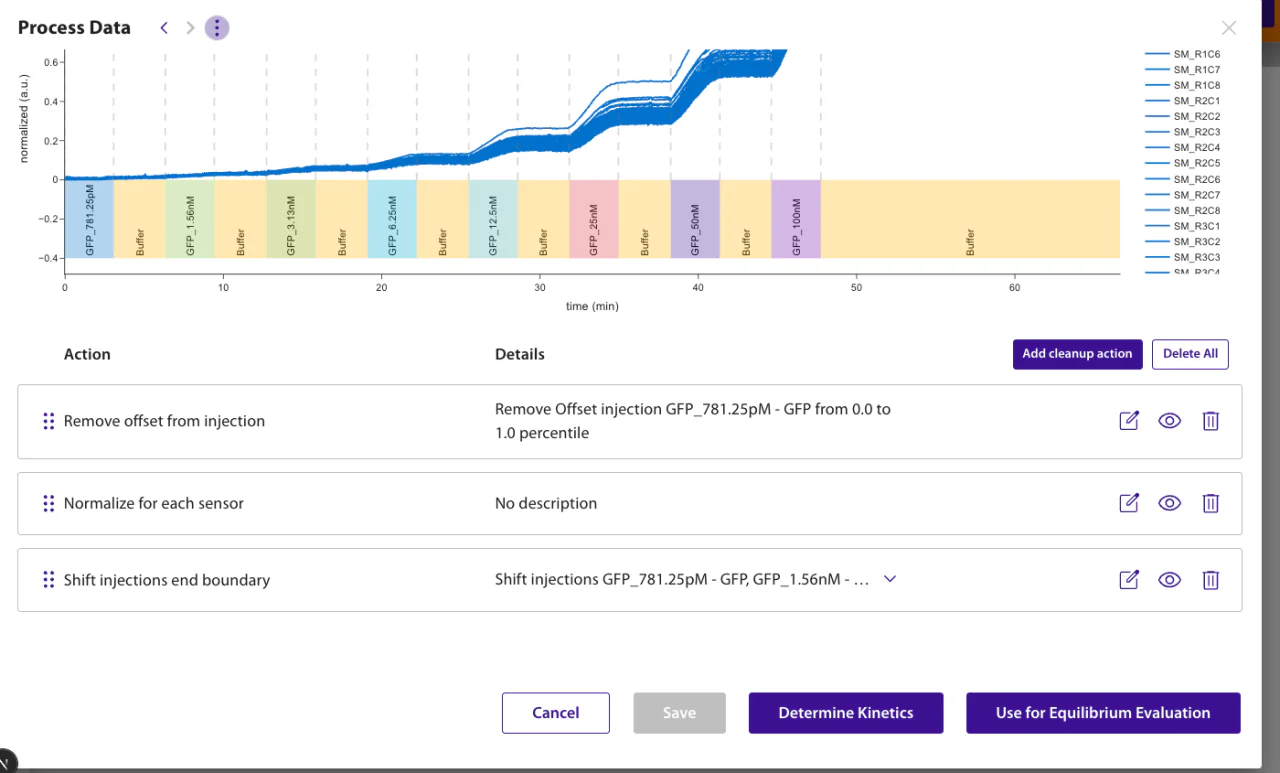
- Open Add cleanup action from processed data or an evaluation's Cleanup or Fitting step.
- Choose an action and configure the interval or data it should use.
- Inspect the preview, select Apply (Update when editing an existing action), and repeat only if another correction is justified.
Descriptions beneath action titles identify the selected inputs and settings. An en dash marks a range, commas separate individual selections, and an arrow marks a name change. Full stops separate settings. Blank and Targets distinguish the reference from the data being corrected.
Rules that affect results
- Order matters. Each action receives the output of the enabled actions above it. Drag actions to reorder them. Group injections splits the trace into cycles, and every action after it runs once per cycle. Keep only injection group works only below it, while Add manual injection, Remove phases, Remove zero crossed traces, Edit immobilizations, Subtract blank phase, Subtract fit, Apply math operation to processed data and Concatenate processed data cannot run after it. The order is not policed as you build the list; an action in the wrong place reports the error on its own row when the list runs.
- Selection is separate from cleanup. To exclude molograms from an evaluation, change the data selection instead of adding an action. If the selected phase or molograms change, the list is applied to the new selection and incompatible actions show an error.
- Disabling is for comparison, and is never saved. A disabled action stays in the list but is left out of the preview. In Determine Kinetics, Equilibrium and Limit of Detection, and when saving processed data, a disabled action is still run — so the preview would not match the result — and the workflow refuses to advance until every action is enabled again or deleted. Concentration Determination instead runs only the enabled actions.
- Most defaults are explicit, but not all are editable. Starting from raw data adds the defaults the selected data supports — applicable blank subtraction, immobilization normalization, and the Keep only injections and offset-removal trims — and they appear in the list where you can inspect or delete them. Two have no editable form: Group injections and Keep only injection group are applied as-is and must be removed rather than adjusted. An evaluation may also transform its input in ways that never reach this list; the evaluation's own page is what documents those.
Automatic immobilization normalization uses one shared action for a single immobilization injection. With multiple injections, it suggests an action for each compound based on the median response across its selected molograms. Steps reaching at least 5.00% of that compound's strongest response qualify. A smaller step or an intervening injection other than a baseline separates blocks; the block with the largest total response is selected. Equal totals favor the later block. Each action normalizes using its selected steps' summed responses and a median reference per ligand.
These are editable suggestions, not a record of which compound was deposited. The heuristic can omit smaller or separated contributions and include drift or nonspecific responses. Review the selected injections before fitting. Each normalization action lists its selected immobilization injections in the description; automatic selection is labelled as the last detected step. Compounds without a positive median response get no suggestion. Without usable compound assignments, one shared action uses the last detected immobilization step.
Re-evaluating restores the cleanup used by the previous evaluation. Processed data opens with its stored cleanup. Use Save as processed data only when the transformed trace should be reusable outside the current workflow; fitting uses the current cleanup actions without requiring saved processed data. Fitted drift opens the raw full measurement for fitting even when the selection is limited to one phase. It must be the first cleanup action so its coefficients always match that input; the editor places a newly added fitted drift there. The correction still applies only to the selected data and successfully fitted molograms. A fitted-drift action is tied to the measurement, phase, property, and algorithm where its fit was created; create a new fit after changing any of them.
For automatic SCK drift removal, choose Drift Correction, then Linear Fit for SCK. It fits the last 90.0% of every baseline buffer immediately following a regeneration in the full measurement and applies the linear correction across all selected data. At least two such buffers are required; otherwise the data is reported as unsuitable. The action has no inputs and is saved as Subtract fit. Edit it through Fitted Drift to adjust the application settings or create a new fit.
Math operation and Concatenate also use the cleanup result at their position in the list, including unsaved actions above them. Their other dataset must be saved processed data; the action keeps that saved snapshot with its data selection and cleanup actions.
Choose an action
See the Cleanup Action Reference for the actions available in the picker and what each one changes.